
My Skills
My Skills manages capabilities that apply only to the current user. You can create writing guidelines and workflows through guided forms, or install an existing standard Skill or expert package. Creation and installation are parallel entry points for different use cases.
Personal scope
Skills under My Skills apply only to the current user. They do not change another member's Skills or replace enterprise Skills published by an administrator. Skills installed from a conversation also appear here.
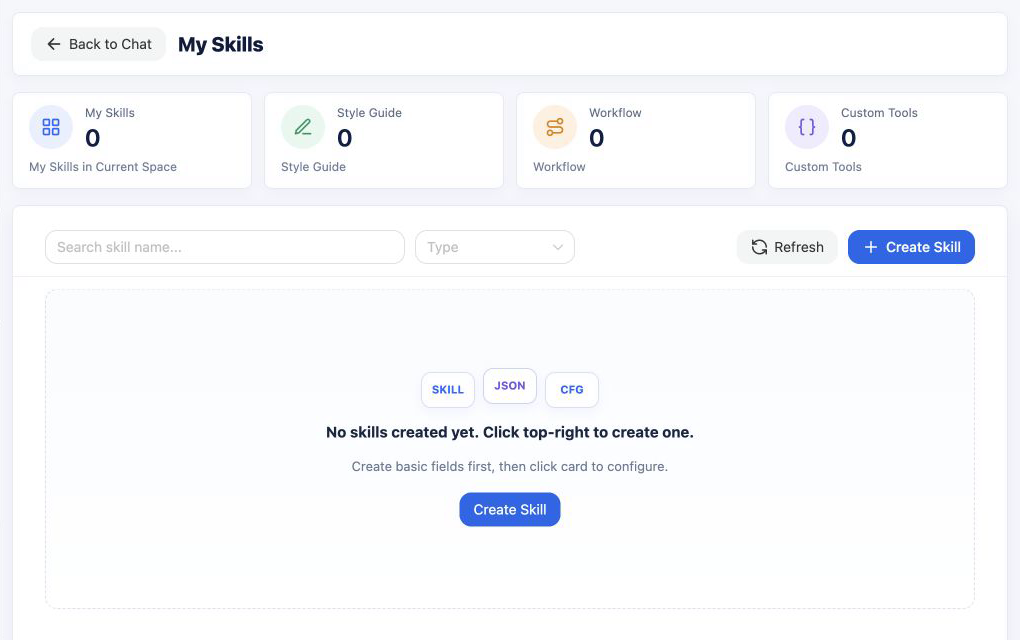
Supported types
| Type | How it is added | Best for |
|---|---|---|
| Writing guideline | Guided creation | Consistent structure, tone, length, and content boundaries |
| Workflow | Guided creation | Explicit steps for reading, retrieval, processing, generation, and delivery |
| Standard Skill | ZIP or conversational installation | Capabilities distributed through a Skills marketplace, community, or team |
| Expert package | ZIP installation | One orchestration guide plus multiple package-internal child Skills |
MOVO manages installation, scope, and enabled state for standard Skills and expert packages. DSH identifies and executes them at conversation runtime.
Create with guided configuration
- Select Create Skill, then enter the name, summary, and intended use.
- Choose Writing guideline or Workflow.
- Complete the structured rules or arrange the workflow steps visually.
- Preview, test, and refine the configuration before enabling it.
This flow does not require knowledge of Skill package structure or hand-written SKILL.md files.
Review material with a Review Check step
In a Workflow Skill, add a Review Check step to examine material or results produced by earlier steps against specified criteria. Contract reviews and outbound-material reviews use the same setup:
- Add a Read material step and name its output. The user can upload a file when running the Skill, or you can select an already parsed knowledge document that your account can access.
- Add Review Check and select that earlier output under What to review.
- Under Review criteria, select another earlier output (for example, contract review rules or an external-communications policy), or choose Enter criteria and type the rules directly.
- Choose Separate report, Comments in original, or Both, then name the review output so later steps can use it.
- Preview and test the workflow, confirm that the rules apply to the material, and publish the Skill.
Contract example: Upload a contract, apply the organization's contract review rules, and ask for the relevant contract text, rule, risk, and suggested change for each finding. Flag anything that cannot be verified for human review.
Outbound-material example: Upload a document intended for external distribution, apply the organization's release rules, and check for sensitive information, unverified claims, and required notices, citing the source text and suggesting changes.
Comments in original adds precisely located comments to a copy of an uploaded DOCX file while preserving its formatting. Other file formats receive a separate report instead. Findings that cannot be located precisely are not inserted as comments and should be reported separately. An Agent produces the findings from the material and rules; a responsible person should review them before formal contract or external-release approval.
Install from a ZIP file
Select Install from ZIP and choose a local file, or drag the ZIP into the installation area. A package can be up to 100 MiB.
MOVO automatically detects and validates two package formats:
- Standard Skill package: the ZIP must contain exactly one
SKILL.md, either at its root or inside one top-level directory. Keep the Skill's other resources under the same directory. - Expert package: the ZIP must contain
manifest.json, an orchestration guide atskillsets/<slug>.md, and each child package declared by the manifest atskills/<child-slug>.zip.
After validation, the dialog shows the Skill name, version, file count, package type, and actionable warnings. Expert packages also show their internal child Skills. Confirming the installation adds and enables the personal Skill. If the same Skill already exists, the flow reports whether the package is a duplicate or an update.
Missing files, invalid directory structure, malformed metadata, and incompatible version formats are reported inside the installation dialog with the related file or field. A version mismatch between _meta.json and SKILL.md does not block installation: MOVO shows a warning and uses the package version from _meta.json.
Install a SkillHub Skill in a conversation
You can also request an installation directly in a conversation, for example:
Follow https://skillhub.cn/install/skillhub.md and install @author/skill-slug.When DSH recognizes the installation intent, it calls the built-in installer. MOVO downloads the package from a supported SkillHub address and reuses the same validation and persistence path as local ZIP installation. The execution timeline shows an Install personal Skill event. After success, the Skill appears in My Skills and is available to runtime selection from the next conversation turn.
Conversational installation only creates a personal Skill. Enterprise Skills must be installed, enabled, and authorized by an administrator in the enterprise admin console.
Use Skills in a conversation
- Manual selection: select an available Skill before sending a message. The execution timeline shows the selected Skill and whether it is personal or enterprise-provided.
- Automatic selection: if no Skill is selected manually, DSH can choose one from its name, description, and intended use. When it does, the timeline shows the chosen Skill as well.
- Expert packages: only the parent expert package participates in the first selection stage. Once selected, DSH receives its orchestration guide and internal child Skills and decides how to combine them under that guidance. Child Skills do not appear as separate entries in My Skills.
Open a Skill in the list to review its name, description, intended use, type, and package information. Expert packages also list their internal child Skills. You can enable, disable, update, or uninstall a Skill from the same page.
Share with organization members
A personal Skill can be shared directly with other members of the current organization:
- In My Skills, select the share action on a Skill card.
- Search by name, account, email, or phone. You can select multiple recipients in one operation.
- Recipients see a pending count both beside My Skills in the sidebar and on the Shared with me tab.
- After reviewing the name, description, type, version, and sender, a recipient selects Accept and install. The installed copy then appears in that recipient's My Skills.
Sharing sends a snapshot of the currently published version. A writing guideline or workflow created with the guided editor must be published before it can be shared. Further edits remain in a draft until the owner publishes a new version, at which point direct recipients who installed the Skill receive an update notice. Each recipient can enable, disable, and maintain an independent copy; those changes do not modify the owner's Skill.
The share dialog can also create a link that works only inside the current organization. A signed-in recipient can preview and install from the link. The sender can set an expiry or revoke the link.
Share source
A Skill installed from a share retains its source and shows the sender in its details or configuration page. When a member has no public display name, the UI uses a generic organization-member identity or a masked account instead of exposing a full phone number.
Reviews, replies, and likes
Senders and recipients can discuss a Skill through the review action on its card:
- The number on the card is the total review count for the current sharing discussion. The review action and navigation show an unread indicator for new comments or replies.
- Members can post a review, reply to a specific review, and like the Skill discussion or an individual review.
- Opening the relevant discussion marks the visible messages as read.
- Discussions follow direct sharing relationships. If A shares with B, A and B share one discussion. If B later shares with C, B and C get a separate discussion; C's review does not notify A.
- A reply notifies the person being replied to. A new top-level review notifies the Skill sender in that direct sharing relationship.
Reviews do not change the Skill or create an administrator ticket. The sender can use the discussion to improve a draft and publish a new version when it is ready.
Updates to a shared Skill
When the sender publishes a new version, direct recipients see Review and update. The confirmation dialog shows the installed version, new version, release notes, and changed areas before installation.
If a recipient edits the installed copy, its card shows Local changes. A later upstream update warns that those changes will be replaced and requires explicit confirmation. Update notices travel only in the original sharing direction: an update from A notifies B, while edits to B's independent copy do not notify A. If B shares that copy with C, B becomes the owner of the new sharing relationship.
Updating replaces the Skill content while preserving reviews, replies, and likes in that sharing relationship.
Runtime dependencies and usage boundaries
- A raw ZIP with multiple
SKILL.mdfiles is rejected unless it follows the expert package format above. MOVO does not automatically split it into separate Skills. - Skills that require API keys, client credentials, an additional runtime, or private services need the corresponding dependencies and security configuration to be prepared by an administrator.
- Tools and other runtime capabilities referenced by a Skill must exist in the current environment. Successful installation confirms package structure and metadata; actual availability also depends on those runtime dependencies.
- Direct member sharing and its discussions are available only inside the same organization and are not published externally.
After creating or installing a Skill, test manual selection, automatic selection, and any actual tool calls in a real conversation.