
Scheduled tasks
Scheduled tasks ask an Agent to send a prompt and complete work at a specified time. They are useful for daily summaries, recurring information retrieval, data checks and reminders.
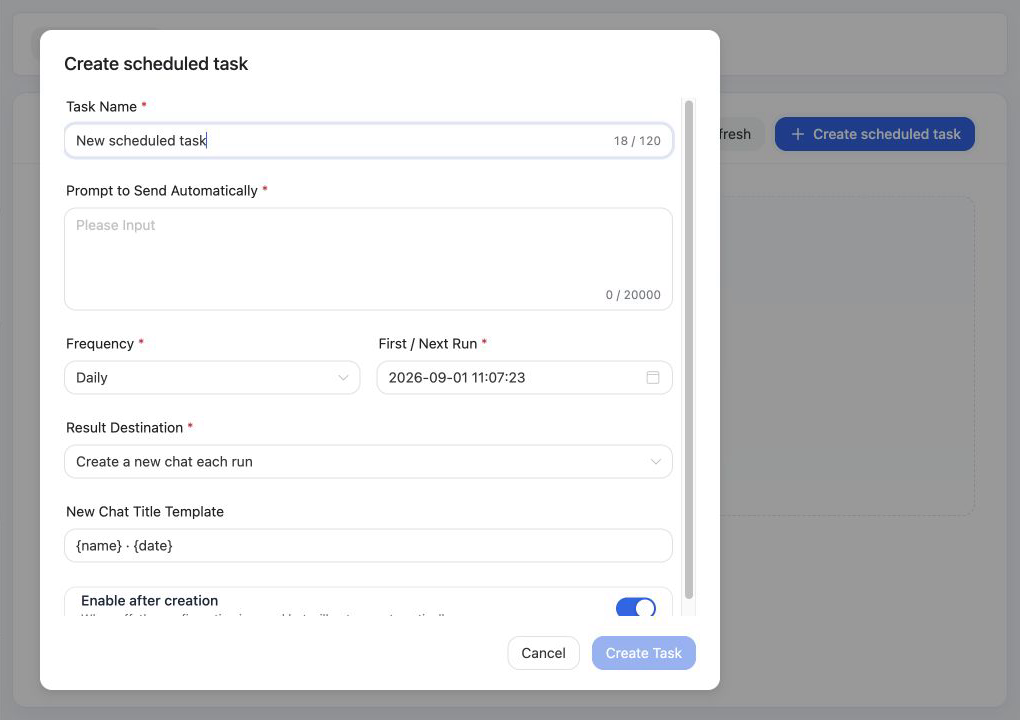
Create a task
Select Create scheduled task and configure:
- A task name and the prompt to send automatically.
- A one-time, daily or weekly schedule.
- The first or next execution time, plus the weekday for a weekly task.
- Whether results are written to a selected conversation or each execution creates a new conversation.
- Whether the task is enabled immediately after creation.
Tasks use the timezone configured for the deployment. Write an unattended prompt with a clear goal, data scope, output format and completion criteria.
Manage tasks and review results
The list supports search, refresh, edit, enable, disable, run now and delete. Results are written to the selected conversation. If each run creates a new conversation, MOVO uses the configured title template for the result.
Scheduled work consumes model, knowledge and Tool resources. Validate a task with a manual run before enabling a frequent schedule, and monitor personal and enterprise Token quotas.
Common uses
- Summarize current public information for a topic each day and include sources.
- Compile weekly progress, risks and action items from a project conversation.
- Call a personal Tool periodically and report unusual business data.
- Generate a daily report, weekly report or structured document draft on schedule.