
Conversations, tasks and multimodal work
Start a conversation
Enter a goal on the home page and send it. For better results, specify the audience, source material, delivery format and constraints. For example:
Analyze the attached product screenshot, extract the key information, produce an English issue list and deliver it as a downloadable Word report.
During execution, expand Activity to see what the Agent is doing. After completion, copy the answer, continue the conversation or turn the message into a scheduled task.
The home-page shortcuts are convenient starting points rather than capability boundaries:
- Content generation: Social content, reports, proposals, presentations, image-to-PRD, document translation and spreadsheet filling.
- Web search: Current information, industry research, competitor analysis, policy and news tracking, literature reviews and fact checking.
- Internal knowledge: Policies, project material, historical documents, customer information and training material.
- Connect systems: Query business data or perform governed actions through enterprise Tools, MCP and APIs.
The Agent selects the relevant Plugin, Skill or Tool for each task. Users can inspect Activity to verify actual calls. Operations that write enterprise data can be routed through approval.
Image understanding
Select the attachment button, upload an image and describe what should be recognized, compared or extracted. MOVO supports image descriptions, OCR, interface analysis and chart understanding. Available vision models are controlled by the enterprise administrator.
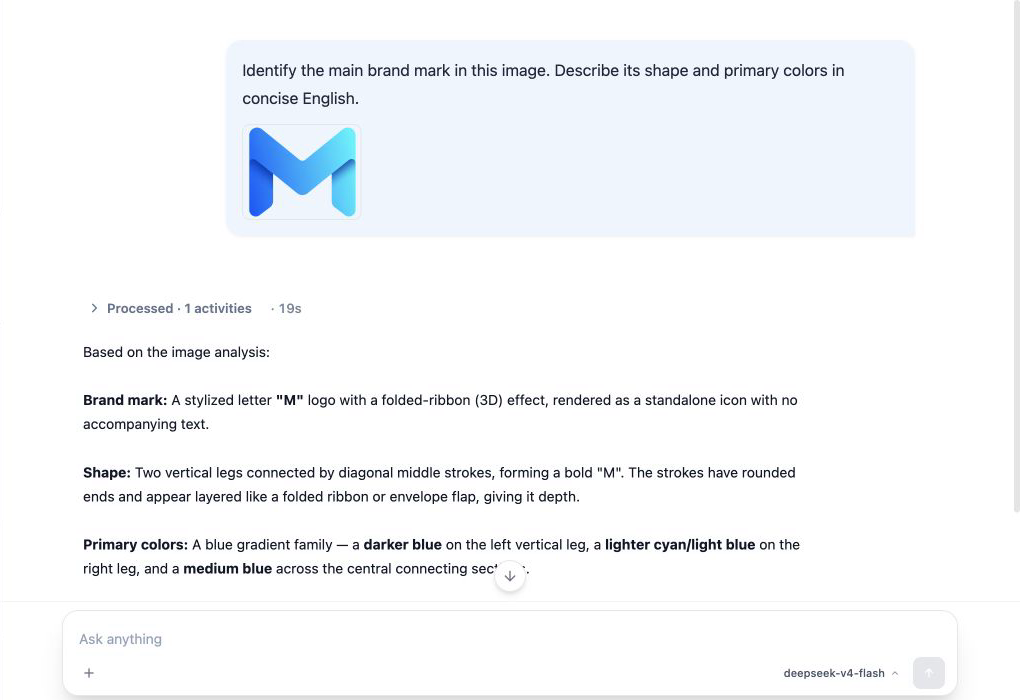
The example above shows MOVO recognizing the uploaded brand mark and its visual characteristics. Model-generated visual analysis should not replace the source design file when exact dimensions, colors or compliance conclusions are required.
Documents and deliverables
Upload source material with Upload document. MOVO can use installed Plugins, Skills and Tools to deliver more than chat text:
- Parse PDF, Word, Excel, PowerPoint, CSV, Markdown and other common formats.
- Generate reports, proposals, contract drafts, presentations, spreadsheets and multi-format files.
- Export files, convert formats, summarize, translate and extract structured information.
- Understand images, run OCR, generate images and process visual content.
- Perform progressive search, web retrieval, page collection and multi-source research.
- Retrieve internal knowledge, trace citations and answer questions grounded in enterprise sources.
- Run browser tasks, execute code and call MCP or enterprise HTTP interfaces.
Exact availability depends on the models, Skills, Tools and deployment components enabled by the enterprise.
Select a generated image to preview it. The viewer supports zoom in, zoom out, reset and download in both the browser and desktop workspace.

When an administrator selects an external knowledge base, the composer shows its configured name. Evidence labels external sources and offers Open in source system if the tool returns an original document URL. External documents are not previewed inside MOVO; without a URL, no original-document action is shown.
Share a conversation with organization members
For a server-run conversation, the owner can select the share icon in the top-right corner to open Share session:
- Set the link lifetime to 7, 30, or 90 days (30 days by default).
- Select Create share link, copy the link, and send it to a member of the same organization.
- After signing in and opening the link, the recipient joins automatically and finds the conversation under Shared with me. Members can read the full history and continue the same conversation; messages identify their authors.
The dialog lists the session members. The owner can remove a member or revoke the link; a participant can leave. Revoking the link prevents new joins through that link but does not remove existing members. A removed member can rejoin while the link remains active, so revoke the old link as well if you need to prevent that.
Sharing scope
Only signed-in users in the same organization can use the link. A participant can read the full conversation history, including existing attachments and generated results. Check that this content is appropriate for recipients before sharing. Each member uses their own model, Tool, and Skill permissions when continuing the conversation.
Share a desktop Code conversation
A desktop Code conversation can create a read-only sharing link. It captures completed conversation text at the time the link is generated, including multiple user and assistant turns in order with their authors. Recipients must sign in to the same organization. They cannot reply or run code from the shared page, and the snapshot does not include the sharer's local code files. Later messages are not added to the existing snapshot. The owner can set an expiration and revoke the link.
Ordinary server-backed conversations in the desktop app continue to use the member collaboration flow above. The read-only snapshot applies to locally executed Code conversations.
Conversation management
- Use New conversation to isolate separate task contexts.
- Search conversation history by keyword.
- Follow-up questions can use the context already present in that conversation.
- Start a new conversation when the knowledge scope or source attachments change substantially, so earlier context does not interfere.